
One view for the field
See the work your field team has actually recorded
A manager needs more than a stream of messages to understand the day. Trurep brings submitted customer visits, sales and team activity into one web workspace so you can see the work behind the numbers.
Use the overview for key totals and recent check-ins, then open the underlying records to follow up. Growth and Enterprise add deeper field analytics and location review tools.
What your team can do
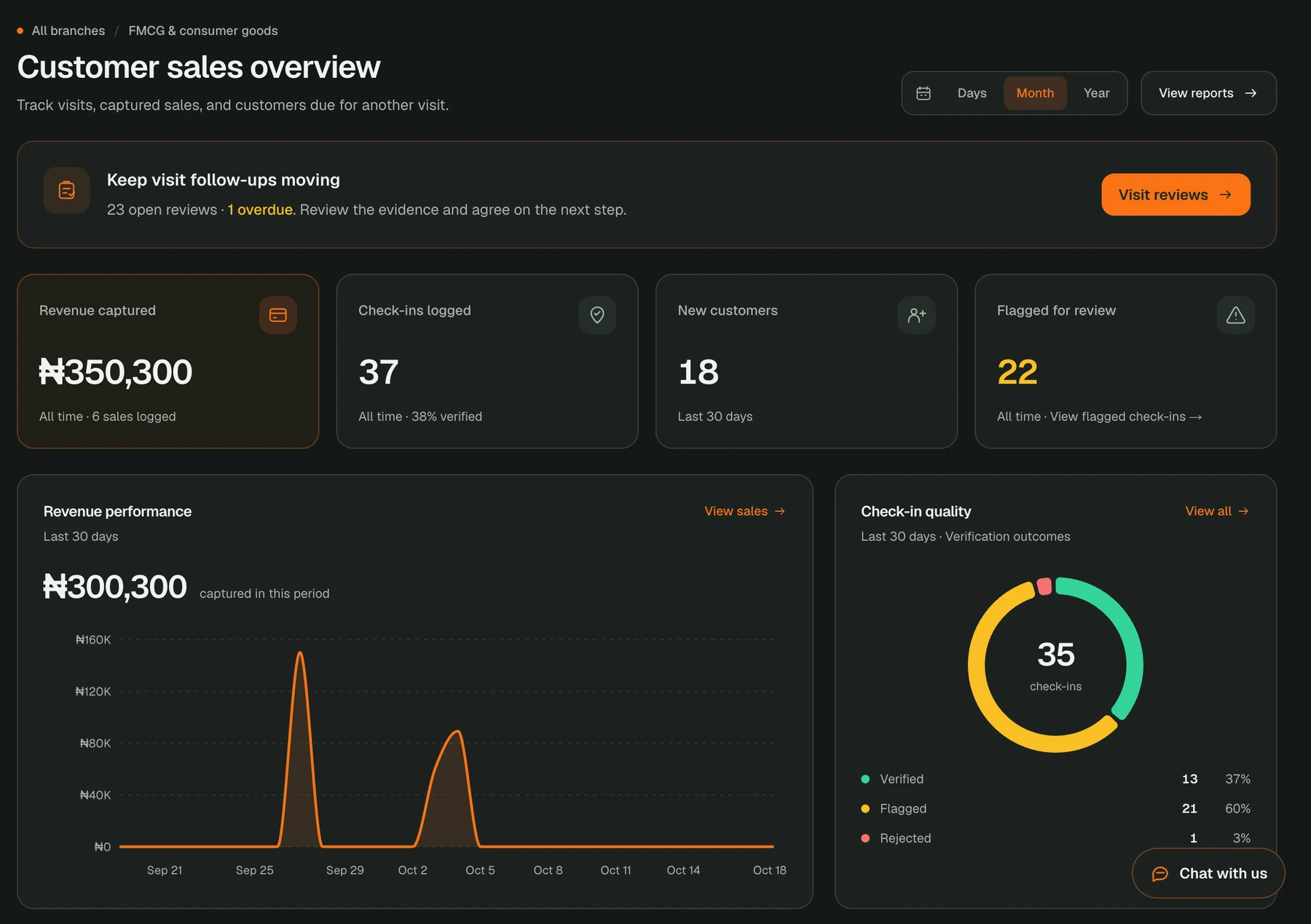
See activity together
Check-ins, recorded sales and recent field activity appear in the same workspace. Move from a summary to the visits or transactions behind it.
Track performance over time
Review sales trends and team performance for a selected period. On eligible plans, interactive analytics add more detail about field activity and check-in outcomes.
Act on exceptions
Find flagged visits and use the review workflow to examine evidence, ask for context and record a clear resolution.
From field entry to a useful overview
Set up the team and customers
Invite the people who work in the field and add the customer records they use. Give managers access to the appropriate organization or branch.
Capture work on mobile
Reps submit customer check-ins and sales in the app. Entries made during a connection gap wait on the phone until they sync.
Read the dashboard
Review check-in totals, sales captured and recent activity. Open a record to see the customer and field evidence behind a figure.
Follow up with the team
Use trends and exceptions to decide which customer, visit or rep needs attention, then document the next step in the relevant workflow.
Questions about field operations dashboard
Does the dashboard show work saved offline?
Only after the phone reconnects and the entry syncs successfully. The app can hold pending work locally, but the web dashboard cannot show a record it has not received.
Can a manager inspect an individual visit?
Yes. Open the check-in to review its customer, rep, status and available location evidence. On eligible plans, flagged visits can be handled through the review workflow.
Is the same dashboard shown for every industry?
The workspace adapts its labels and workflows to the organization’s selected industry. The shared foundation is team activity and customer visit records; sales and delivery views appear where those workflows apply.
Which plan includes analytics?
Starter includes the daily overview. Growth adds interactive sales and field analytics, and Enterprise includes those features with multi-branch controls.
Put Trurep to work for your team
Starter includes the field overview. Compare Growth and Enterprise for interactive analytics, visit review and multi-branch access.
Explore more of Trurep
GPS Sales Rep Tracking
Track field sales visits with Trurep. Capture GPS check-ins, site photos and sales, then review customer coverage and flagged visits from your dashboard.
Offline Field Sales App
Keep field sales moving with Trurep’s offline mobile app. Save customer check-ins, photos and sales on the phone, then sync when a connection returns.
Delivery Tracking Software
Follow active delivery runs with Trurep. Review driver locations, recorded routes, destinations, products and delivery history in one operations dashboard.
Anti-Fraud for Field Visits
Review field visits with location evidence. Trurep rejects mock-location check-ins and, on eligible plans, flags visits outside the customer geofence.
AI-Generated Team Reports
Read plain-English summaries of recorded field activity in Trurep, with daily agent and team reports on eligible plans.